The review inbox
Reviews is where the daily work happens: every included location's reviews in one list, the ones still waiting for a reply at the top, and the reply box beside the review you pick.
The page at a glance
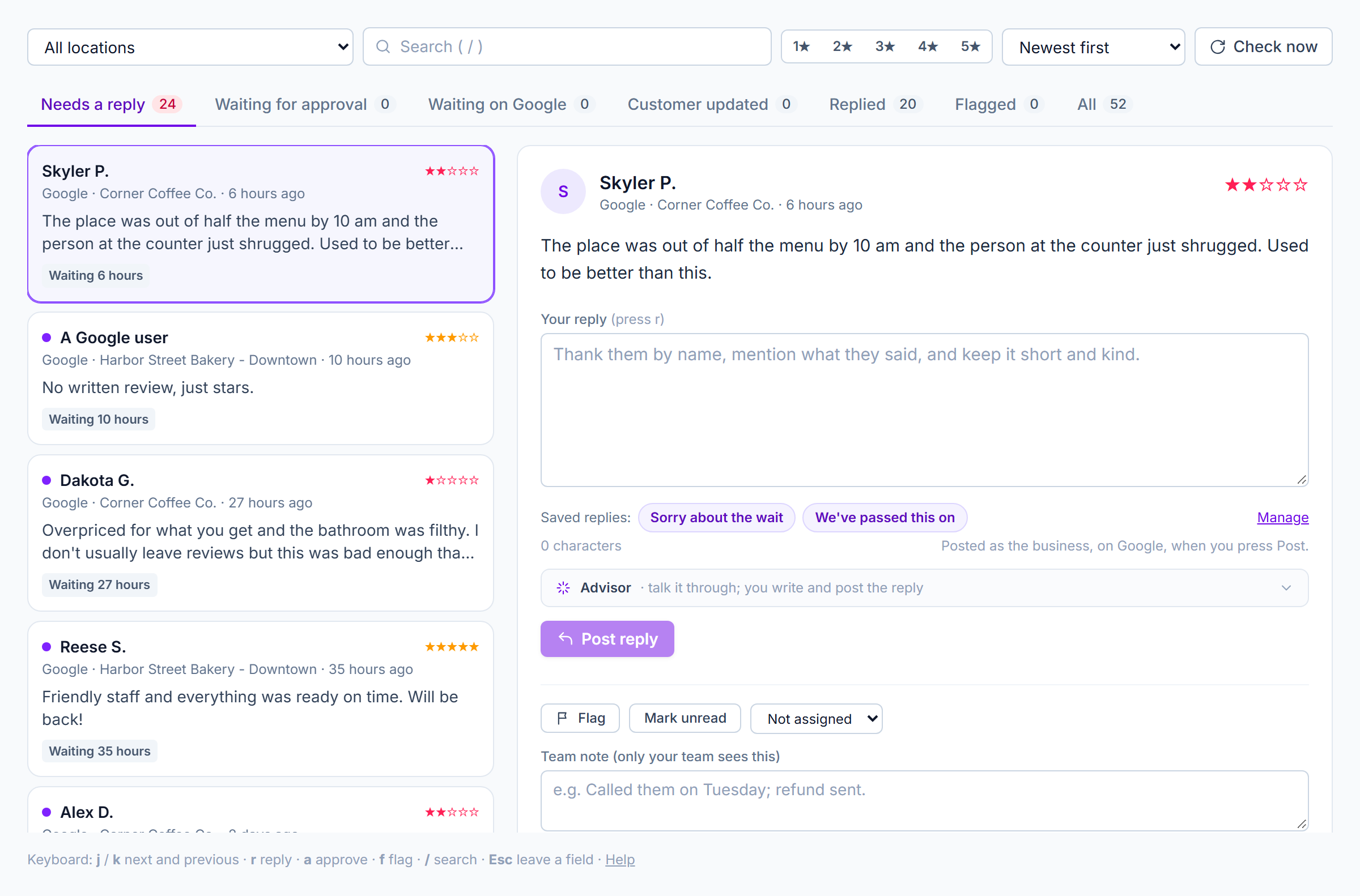
The Reviews page with the sample businesses: filters and the counter strip across the top, the list on the left, the chosen review and its reply box on the right.
On a phone or a tablet held upright, the list fills the screen and a review opens over it; All reviews at the top goes back.
Filters, across the top
- Location: All locations, or one. The number beside a location is how many of its reviews wait for a reply. Location managers see only their own locations here.
- Search: finds words in the review, the reply, the reviewer's name or the location. Press / to jump to it.
- Stars: press one or more star buttons to show only those ratings. Press again to clear.
- Sort: Newest first, Oldest first, or Lowest rating first.
- Check now: asks Google for new and changed reviews right away. StellaQuin checks every ten minutes on its own; this is for when you don't want to wait. It also compares your list with Google and removes any review Google no longer has.
The counter strip
Each counter is a filter. The numbers always cover the location you've chosen, whatever filter is on.
| Counter | Shows |
|---|---|
| Needs a reply | Reviews with no reply at locations where Google allows replies, and nothing waiting for approval. The daily to-do list. |
| Waiting for approval | Replies a teammate wrote that an approver hasn't yet posted or sent back. See Approvals. |
| Waiting on Google | Replies posted that Google is still checking. Google shows them to the public once it's done, usually within minutes. |
| Customer updated | The customer changed their review (stars or words) after you answered. The reply may need updating. |
| Replied | Everything with a reply on Google. |
| Flagged | Reviews you flagged to come back to. |
| All | Everything from the last 30 days. |
A review in the list
Each card shows the reviewer's name (or "A Google user" when Google hides it), their stars, the location, when it was written, the first lines of the review, and badges:
- Waiting 2 hours / 3 days: how long an unanswered review has waited. It turns red after two days.
- Waiting for approval, Sent back: see Approvals.
- Can't reply here: the location isn't verified on Google yet.
- Waiting on Google's check, Live on Google, Rejected by Google: where the reply stands. A rejected reply broke one of Google's rules (usually a phone number, a web address, or language Google filters); edit it and post again.
- Customer updated, Flagged.
A purple dot marks a review nobody on your team has opened yet.
The selected review
On the right: the reviewer, their stars, the location and date, and the whole review. When Google provides the reviewer's photo it's shown; nothing is copied, it's loaded from Google each time.
The reply box
- Your reply: write here. Press r to jump to it. The count beneath shows characters; Google allows up to 4,096 bytes, and around 320 characters reads best, so the count turns amber beyond that and red if Google would refuse it.
- Saved replies: your own words for the things you say often, offered for the review's rating. Pressing one puts its words in the box, with the customer's first name and the location filled in; change anything you like. See Saved replies.
- Save as saved reply: after writing a reply you'd use again, keep it. The name and location you typed become fill-ins.
- Advisor: an optional helper for the person writing, when your organization has connected one. See The AI advisor.
- Careful mode: when it's on, a note beneath the box checks your words as you write. See Careful mode.
- Post reply: sends the reply to Google as your business. If the location's rule says this reply needs approval, the button reads Send for approval instead and the reply goes to the approvers.
After posting, the reply shows beneath the review with who wrote it and when, and the badge follows Google's check. Edit reply changes it on Google; Delete reply removes it from Google after asking.
If the review has no written text, the box still works: a short thank-you for the stars is worth posting.
Your own records
Beneath a line under the reply:
- Flag / Flagged: mark a review to come back to. The Flagged counter collects them. Press f.
- Mark unread: puts the purple dot back, so a teammate notices it.
- Assign to (admins): hand the review to a teammate. Their name shows on the card.
- Team note: anything your team should know ("Called them on Tuesday; refund sent"). Only your team sees it; it's never posted. Saves when you leave the field.
These records are StellaQuin's own and are kept for as long as you like, even after the review itself ages out of the 30-day window.
Keyboard
| Key | Does |
|---|---|
| j / k | Next and previous review |
| r | Jump to the reply box |
| a | Approve the waiting reply (approvers) |
| f | Flag or unflag |
| / | Jump to search |
| Esc | Leave a field |
When nothing is waiting
The list says Every review is answered. New reviews appear as they arrive; the Locations page shows when StellaQuin last checked.
The last 30 days
Google allows apps like StellaQuin to keep review content for at most 30 days, so the inbox shows the last 30 days and the line at the foot of the list says so. Older reviews stay on Google, where you can always see them; StellaQuin's own records about them (who replied, notes, flags) are kept. See Your data.
A link straight to one review
Alert and approval emails carry a Reply or Open button that opens the inbox on that one review. If it has aged out, or belongs to a location you don't look after, the inbox says so.